Bugs found in Nomi: AI Companion with a Soul for Android



Nomi.ai is a revolutionary analytics platform empowering retail businesses to make smarter, data-driven decisions. By seamlessly integrating with real-time retail data, Nomi.ai enables meaningful insights and optimizes operations to improve profitability.
The platform’s standout features include an AI-driven analytics engine, live alerting, and flexible custom report generation, covering the full spectrum from actionable business intelligence to hands-on retail enhancements.
Our QAwerk team conducted an extensive Bug Crawl of Nomi.ai for Android—examining critical paths from onboarding and media management to interactive reporting. While the platform’s potential is substantial, several bugs have surfaced that impact app stability, ease of use, and underlying reliability. Below, you can review step-by-step details and visual confirmation for each major finding.
Application crashes when tapping “Download” button
Severity:
Critical
Precondition:
- Log in to the account.
- At least one video exists in the gallery.
Steps to Reproduce:
- Click “Chat” in the bottom menu.
- Click “+”.
- Click “Upload Media”.
- Click “Select File”.
- Select video, click “…”.
- Click “Download”.
Environment:
Xiaomi Mi 10 (Android 13 TKQ1.221114.001, Xiaomi HyperOS 1.0.1.0.)
Actual Result:
App crashes on download action.
Expected Result:
The video should download smoothly to the device.
Send Message button inactive
Severity:
Critical
Precondition:
Log in to the account.
Steps to Reproduce:
- Click “Chat” in the bottom menu.
- Enter the message in the input.
Environment:
Xiaomi Mi 10 (Android 13 TKQ1.221114.001, Xiaomi HyperOS 1.0.1.0.)
Actual Result:
The Send Message button remains grayed out and unresponsive.
Expected Result:
The button should activate after text entry.

Registration form becomes unresponsive while filling in fields
Severity:
Critical
Precondition:
- Google account logged in.
- Open the Nomi app.
Steps to Reproduce:
- Tap “Continue with Google”.
- Select account.
- Enter several characters in the name field.
- Click on other fields.
Environment:
Xiaomi Mi 10 (Android 13 TKQ1.221114.001, Xiaomi HyperOS 1.0.1.0.)
Actual Result:
Form intermittently stops responding.
Expected Result:
Form should remain fully interactive.
Anime avatar filter displays realistic avatars
Severity:
Major
Precondition:
- Google account logged in.
- Onboarding in progress.
Steps to Reproduce:
- Complete profile up to avatar selection.
- Click the “Anime” filter.
Environment:
Xiaomi Mi 10 (Android 13 TKQ1.221114.001, Xiaomi HyperOS 1.0.1.0.)
Actual Result:
The gallery still displays realistic avatars.
Expected Result:
Displays only anime-style avatars.
App does not request gallery and camera access permissions
Severity:
Major
Precondition:
Log in to the account.
Steps to Reproduce:
- Open media upload or take a photo.
- Observe permission requests.
Environment:
Xiaomi Mi 10 (Android 13 TKQ1.221114.001, Xiaomi HyperOS 1.0.1.0.)
Actual Result:
No permission request shown.
Expected Result:
Android permission dialogs should display when needed.
Markdown formatting symbols are displayed instead of being rendered
Severity:
Major
Precondition:
Log in to the account.
Steps to Reproduce:
Enter prompt producing markdown formatting (e.g., text).
Environment:
Xiaomi Mi 10 (Android 13 TKQ1.221114.001, Xiaomi HyperOS 1.0.1.0.)
Actual Result:
Asterisks and symbols are shown literally instead of actual formatting.
Expected Result:
Formatting should be rendered visually (e.g., bold text).

Character creation hangs at final step for 4 minutes
Severity:
Major
Precondition:
Log in to the account.
Steps to Reproduce:
- Go through onboarding.
- Complete avatar, click “Get Started”.
Environment:
Xiaomi Mi 10 (Android 13 TKQ1.221114.001, Xiaomi HyperOS 1.0.1.0.)
Actual Result:
Process hangs for 4 minutes before succeeding after a restart.
Expected Result:
The creation should finish quickly (max. 15 seconds).
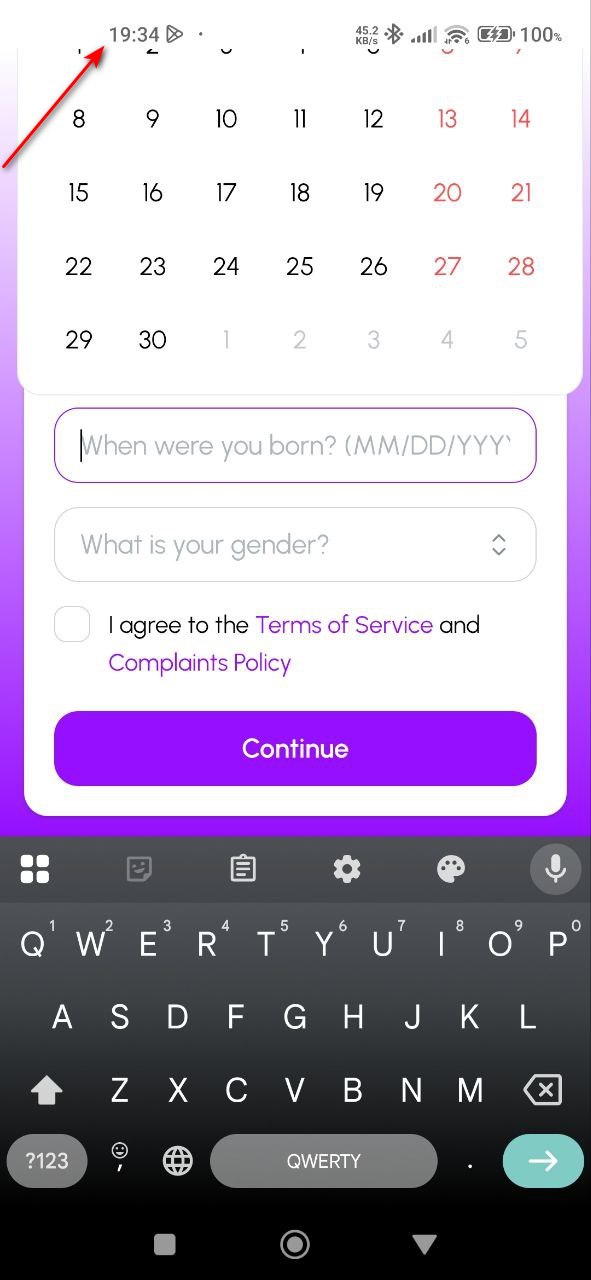
Registration screen calendar widget is cut off and not scrollable
Severity:
Major
Precondition:
Start registration.
Steps to Reproduce:
Open date selector on registration.
Environment:
Xiaomi Mi 10 (Android 13 TKQ1.221114.001, Xiaomi HyperOS 1.0.1.0.)
Actual Result:
The calendar is partially cut off, not scrollable.
Expected Result:
The calendar is fully visible or scrollable.
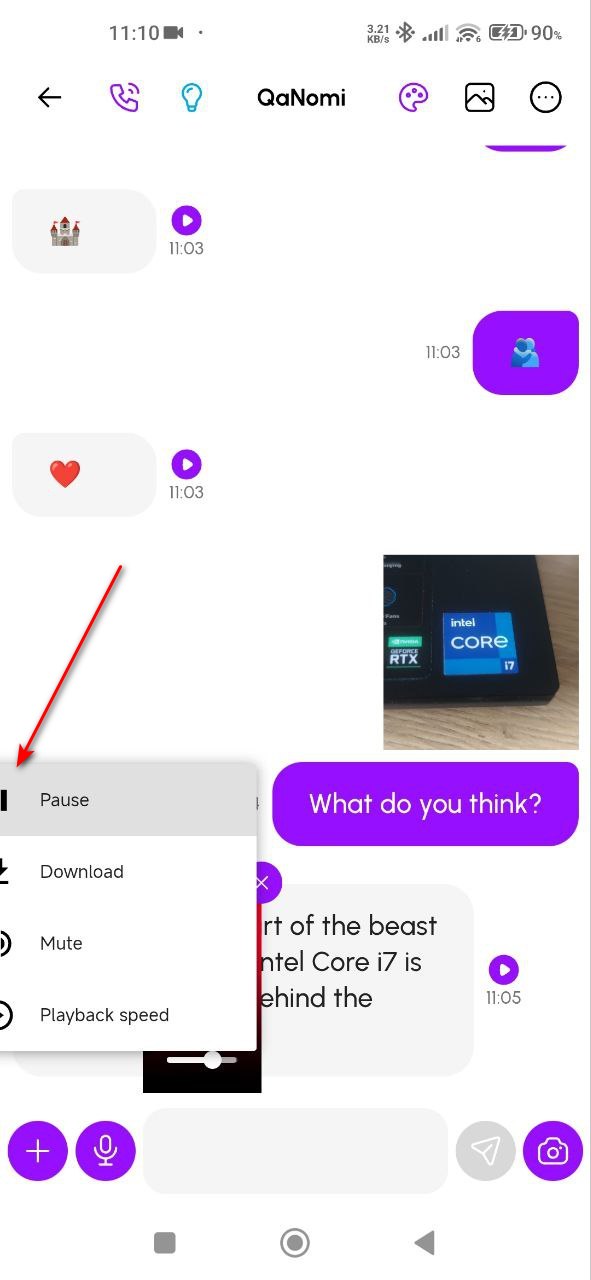
Pop-up menu buttons cut off and extend beyond screen
Severity:
Minor
Precondition:
- At least one video in the gallery.
- The user logged in.
Steps to Reproduce:
Open the three-dot menu after uploading the video.
Environment:
Xiaomi Mi 10 (Android 13 TKQ1.221114.001, Xiaomi HyperOS 1.0.1.0.)
Actual Result:
Pop-up buttons are not fully visible; the menu extends off-screen.
Expected Result:
All buttons fit within the screen.
Subscription plan checkbox is visually squashed
Severity:
Minor
Precondition:
Log in to your account.
Steps to Reproduce:
- Open profile.
- Tap “Subscribe”.
Environment:
Xiaomi Mi 10 (Android 13 TKQ1.221114.001, Xiaomi HyperOS 1.0.1.0.)
Actual Result:
The checkbox appears deformed.
Expected Result:
Checkbox dimensions and shape are correct and square.

Tooltip is cut off and not fully visible
Severity:
Trivial
Precondition:
Log in to the account.
Steps to Reproduce:
- Tap three dots.
- Choose “Image Settings”.
- Click info tooltip for “Face Fidelity”.
Environment:
Xiaomi Mi 10 (Android 13 TKQ1.221114.001, Xiaomi HyperOS 1.0.1.0.)
Actual Result:
Tooltip appears clipped and cannot be scrolled.
Expected Result:
Tooltip is fully visible or scrollable.
Nomi.ai’s Android app is plagued by a combination of critical crashes, media permission oversights, UI layout issues, inconsistent filters, and buggy form navigation. Addressing these will safeguard both power users and newcomers, elevating the quality and dependability of the retail analytics experience.