Bugs found in Simplified AI for Android



Simplified AI is a powerful creative platform that helps users design images, create videos, write marketing content, collaborate, and publish seamlessly across social channels. By integrating AI automation, it supports both simple edits and complex creative workflows.
Our QAwerk team performed an extensive Bug Crawl targeting critical functionalities and overall user experience. We uncovered issues ranging from media export failures to navigation oddities and UI glitches.
The following report highlights these problems and recommends focused enhancements to elevate the app’s usability and reliability.
Image download does not complete, error shown instead
Severity:
Critical
Precondition:
Login to the account.
Steps to Reproduce:
- Scroll to “Quick Tools” on home page.
- Click “Generate Color…” tool.
- Upload an image.
- Click “Download” and “Image” button.
- Wait approximately 1.5 minutes.
- Check phone gallery.
Environment:
Xiaomi Mi 10 (Android 13 TKQ1.221114.001, Xiaomi HyperOS 1.0.1.0.)
Actual Result:
Download fails with error: “Call to function ‘FileSystemNext.downloadFileAsync’ has been rejected. Caused by: java.net.MalformedURLException: unknown protocol: data”. Image not saved.
Expected Result:
Palette image should download successfully without error.
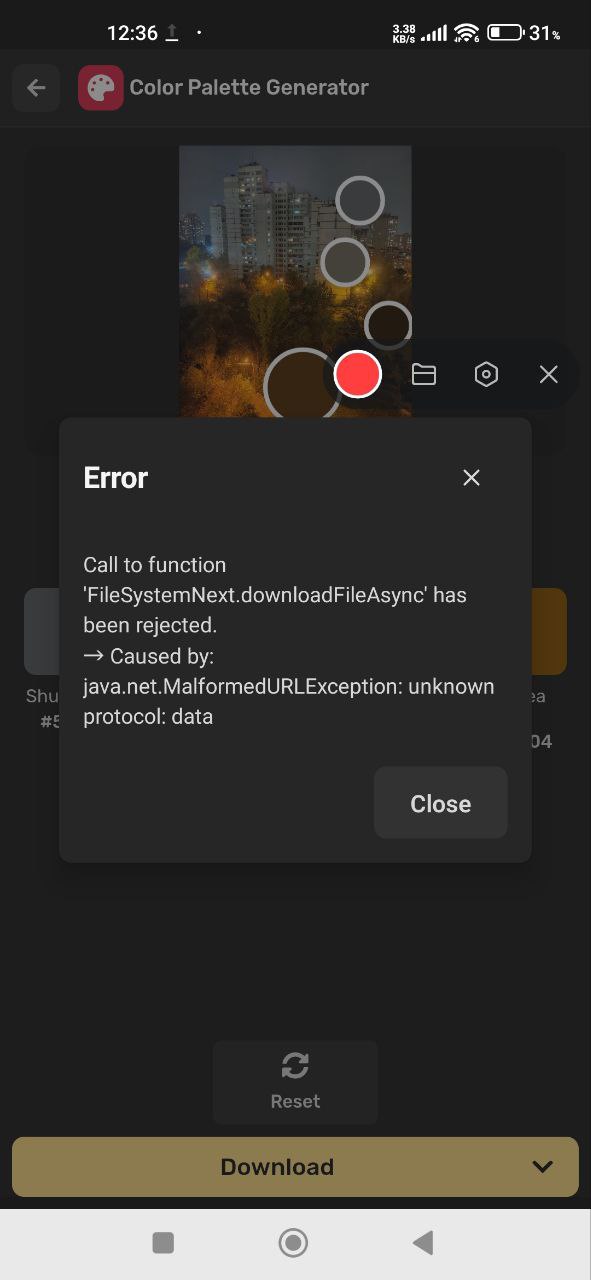
Generated image cannot be downloaded due to invalid file path
Severity:
Critical
Precondition:
- Log in to the account.
- Generate an image in Simplified.
Steps to Reproduce:
- Go to “Recent Works” and choose the “Gen AI” tab.
- Click the image twice.
- Click “Download”.
- Use the upper right download icon.
- Click “Download” again.
Environment:
Xiaomi Mi 10 (Android 13 TKQ1.221114.001, Xiaomi HyperOS 1.0.1.0.)
Actual Result:
Export fails with error: IllegalArgumentException: Illegal character in path at index 96.
Expected Result:
Generated image downloads and saves without error.

Empty AI chat opens after submitting prompt from home page
Severity:
Critical
Precondition:
Log in to the account.
Steps to Reproduce:
- Enter the prompt in the home page input field.
- Press send.
Environment:
Xiaomi Mi 10 (Android 13 TKQ1.221114.001, Xiaomi HyperOS 1.0.1.0.)
Actual Result:
New chat opens, but is entirely empty; the user message is missing.
Expected Result:
Chat displays the user prompt and AI response properly.
Chat conversation merges old and new prompts after first failed prompt
Severity:
Major
Precondition:
Log in to the account.
Steps to Reproduce:
- Submit prompt from home page (triggering Bug 3).
- Return to home.
- Submit new prompt.
Environment:
Xiaomi Mi 10 (Android 13 TKQ1.221114.001, Xiaomi HyperOS 1.0.1.0.)
Actual Result:
Chat processes and merges first and second prompts in same thread; title matches second prompt; prompts are not independent.
Expected Result:
Each prompt from home should open a separate chat without merging.
Generated video does not play after clicking preview
Severity:
Major
Precondition:
- Log in to the account.
- Account balance is 0.
Steps to Reproduce:
- Enter prompt for generating a short video (Instagram reel about coffee time).
- Wait processing.
- Click preview.
- Click download.
Environment:
Xiaomi Mi 10 (Android 13 TKQ1.221114.001, Xiaomi HyperOS 1.0.1.0.)
Actual Result:
Loading spinner shows; video never plays.
Expected Result:
The generated video should open and play successfully.
Video generation result incorrectly displayed as image
Severity:
Major
Precondition:
- Log in to the account.
- Account balance is 0.
Steps to Reproduce:
- Generate a short video prompt.
- Click preview and download.
- Go to “Recent Works” and choose “Gen AI”.
- Click the image twice.
Environment:
Xiaomi Mi 10 (Android 13 TKQ1.221114.001, Xiaomi HyperOS 1.0.1.0.)
Actual Result:
Result displayed as a static image instead of a video.
Expected Result:
Result should display as a playable video.
Generated article cannot be expanded in chat
Severity:
Major
Precondition:
Log in to the account.
Steps to Reproduce:
- Enter the article prompt in chat.
- Wait for generation.
- Click the expand button.
Environment:
Xiaomi Mi 10 (Android 13 TKQ1.221114.001, Xiaomi HyperOS 1.0.1.0.)
Actual Result:
The article does not expand.
Expected Result:
The article expands fully within chat.
Back button leads to Design screen instead of previous step
Severity:
Major
Precondition:
- Log in to the account.
- Generate image prompt.
Steps to Reproduce:
- Go to “Gen AI”.
- Click the image twice.
- Click Edit Image.
- Click the back button.
Environment:
Xiaomi Mi 10 (Android 13 TKQ1.221114.001, Xiaomi HyperOS 1.0.1.0.)
Actual Result:
Back navigates to the Design screen, not the previously generated image view.
Expected Result:
Back returns the user to the prior screen properly.
Copy–paste into chat input triggers auto-send
Severity:
Major
Precondition:
Log in to the account.
Steps to Reproduce:
- Copy generated article text.
- Paste into chat input.
Environment:
Xiaomi Mi 10 (Android 13 TKQ1.221114.001, Xiaomi HyperOS 1.0.1.0.)
Actual Result:
Text auto-sends without a Send button press.
Expected Result:
Paste should not auto-submit; only the Send button sends messages.
App theme switches from dark to light after editing generated image
Severity:
Major
Precondition:
- Log in to the account.
- Generate image.
- Select dark mode and restart app.
Steps to Reproduce:
- Edit generated image.
- Go back out.
- Navigate in app.
Environment:
Xiaomi Mi 10 (Android 13 TKQ1.221114.001, Xiaomi HyperOS 1.0.1.0.)
Actual Result:
The theme switches unexpectedly from dark to light and remains light.
Expected Result:
The selected dark theme should persist throughout workflows.
Undo skips steps after multiple erase actions
Severity:
Minor
Precondition:
Log in to the account.
Steps to Reproduce:
- Use the Eraser tool.
- Erase multiple times.
- Undo the last 2 erases.
- Erase again.
- Undo once.
- Redo thrice.
Environment:
Xiaomi Mi 10 (Android 13 TKQ1.221114.001, Xiaomi HyperOS 1.0.1.0.)
Actual Result:
Undo reverts multiple steps at once; redo reverts stepwise.
Expected Result:
Undo should revert to a single step only; redo consistently stepwise.
Chat opens at middle of last message instead of bottom
Severity:
Minor
Precondition:
Log in to the account.
Steps to Reproduce:
- Send prompt.
- Go back.
- Open chat from the menu.
Environment:
Xiaomi Mi 10 (Android 13 TKQ1.221114.001, Xiaomi HyperOS 1.0.1.0.)
Actual Result:
View stops mid last message, not at the bottom.
Expected Result:
Chat scrolls fully to the latest message.
Hidden delete button in color square triggers unintended color removal
Severity:
Minor
Precondition:
Log in to the account.
Steps to Reproduce:
In Mesh Gradient, click the color squares.
Environment:
Xiaomi Mi 10 (Android 13 TKQ1.221114.001, Xiaomi HyperOS 1.0.1.0.)
Actual Result:
Color was deleted unintentionally due to the hidden trash button area.
Expected Result:
Delete only on explicit visible trash icon click.
One recognized color does not highlight when clicked
Severity:
Minor
Precondition:
Log in to the account.
Steps to Reproduce:
- Generate a color palette.
- Click each color.
Environment:
Xiaomi Mi 10 (Android 13 TKQ1.221114.001, Xiaomi HyperOS 1.0.1.0.)
Actual Result:
One color is not highlighted when clicked.
Expected Result:
All colors should highlight on selection.
Button text does not fit inside button frame
Severity:
Trivial
Precondition:
Log in to the account.
Steps to Reproduce:
- Click “AI Text to Video”.
- Click “Continue” .
- Enter prompt .
- Click “Continue”.
Environment:
Xiaomi Mi 10 (Android 13 TKQ1.221114.001, Xiaomi HyperOS 1.0.1.0.)
Actual Result:
Button text is truncated or does not fit.
Expected Result:
Button text fits clearly inside the frame.


Visual overflow of presentation icon and Beta badge
Severity:
Trivial
Precondition:
Log in to the account.
Steps to Reproduce:
Click the “AI Presentation” button on the home page.
Environment:
Xiaomi Mi 10 (Android 13 TKQ1.221114.001, Xiaomi HyperOS 1.0.1.0.)
Actual Result:
Icon and beta badge overflow container boundaries.
Expected Result:
All elements fit properly inside the container.

During testing, I found 16 issues ranging from major functional bugs to minor UI inconsistencies. These impact everything from content creation and scheduling to navigation and visual polish. Fixing these will markedly improve user confidence and platform smoothness.