Bugs Found in Legends of Amberland II: RPG for iOS



Legends of Amberland II: The Song of Trees is a retro-style RPG featuring character creation, exploration, and party-based gameplay. It’s ad-free and supports offline gaming, providing players with a great experience no matter their situation. If you are fond of 90s games, this RPG will trigger nostalgia and give you several hours of immersive gameplay as you battle monsters and complete quests.
The QAwerk team had a great time testing this game, and the experience was mostly solid and smooth. There were a few bugs that need addressing, especially in dealing with the iPhone’s Silent Mode. Check out our detailed report below.
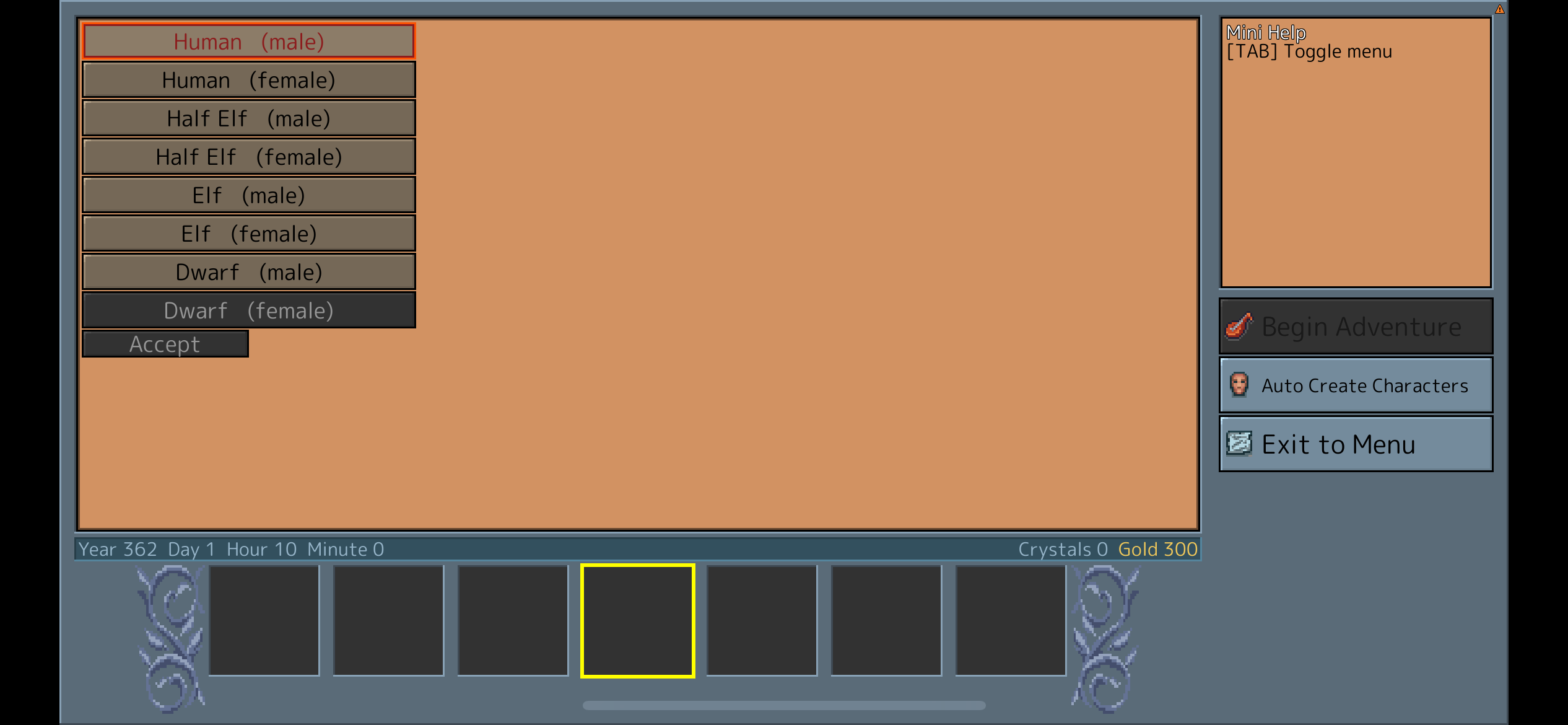
Character selection screen remains empty when starting new game in Airplane Mode
Severity:
Major
Precondition:
- Airplane Mode is enabled, and the device has no internet connection.
Steps to Reproduce:
- Launch the game with Airplane Mode enabled.
- Tap the ‘New Game’ button.
- Navigate to the character creation screen.
- Observe the available character selection area.
- Tap the ‘Auto Create Characters’ button.
- Observe the character selection area again.
Environment:
- OS: iOS 18.4.1
- Device: iPhone 12
Actual Result:
The character creation screen appears partially empty, with no character avatars displayed. However, character avatars appear after tapping the ‘Auto Create Characters’ button.
Expected Result:
The character creation screen should display the available character avatars correctly when starting a new game without an internet connection. Character assets should be accessible offline if offline gameplay is supported.
Game audio continues playing when iPhone is switched to Silent Mode
Severity:
Minor
Precondition:
- The game is launched with audio enabled.
Steps to Reproduce:
- Launch the game.
- Navigate to the main menu or start gameplay.
- Verify that game audio is playing.
- Enable Silent Mode using the iPhone’s physical Ring/Silent switch.
- Observe the game audio behavior.
Environment:
- OS: iOS 18.4.1
- Device: iPhone 12
Actual Result:
Game audio continues playing after Silent Mode is enabled using the iPhone’s physical switch.
Expected Result:
Game audio should respect the device’s Silent Mode setting and become muted when Silent Mode is enabled, provided the game is intended to follow the system’s silent-mode behavior.
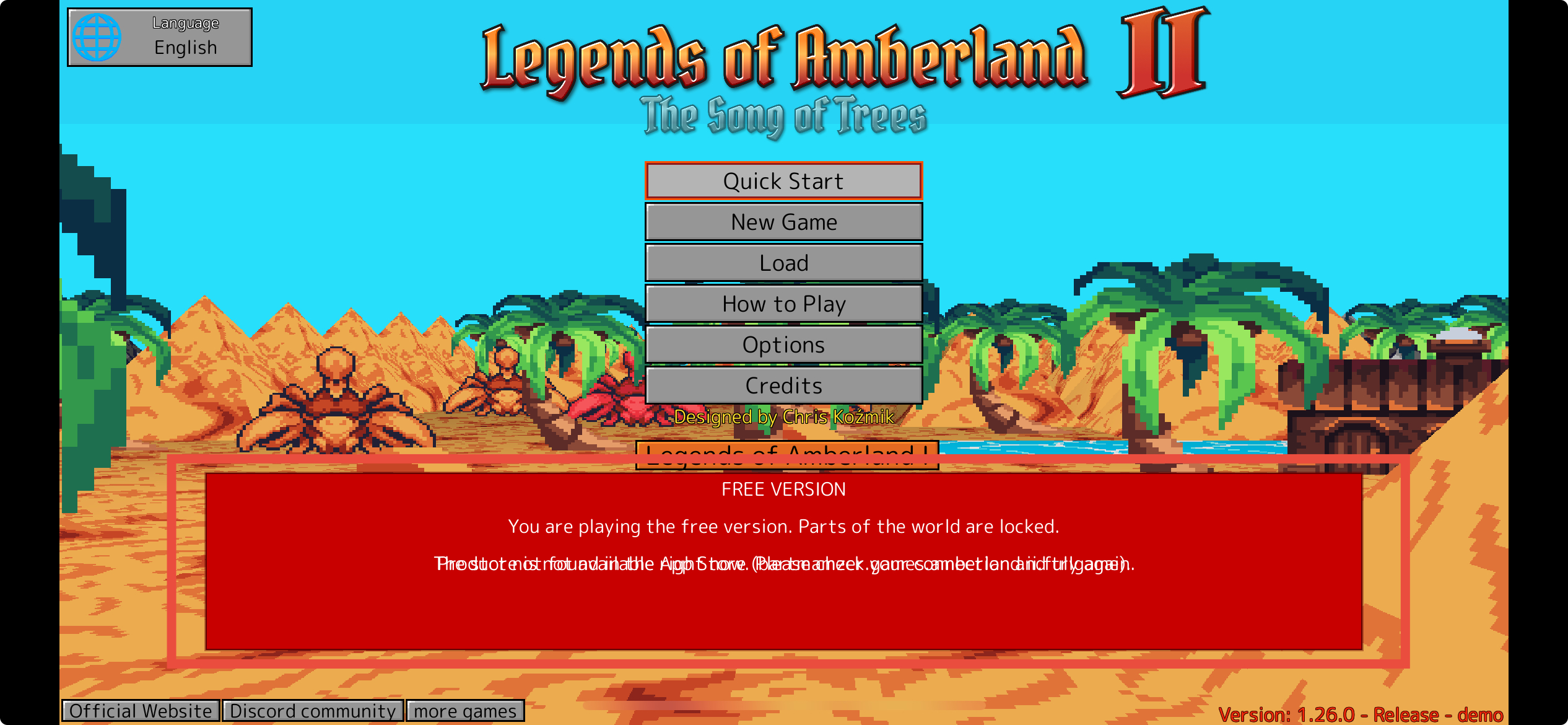
Overlapping messages become unreadable after attempting to restore purchases
Severity:
Minor
Precondition:
- The user is on the main menu of the free version of the game.
Steps to Reproduce:
- Launch the game.
- Locate the ‘FREE VERSION’ section on the main menu.
- Tap the ‘Restore Purchases’ button.
- Observe the messages displayed inside the free-version panel.
Environment:
- OS: iOS 18.4.1
- Device: iPhone 12
Actual Result:
Multiple messages are displayed simultaneously in the same area of the free-version panel. Their text overlaps, making the messages difficult or impossible to read.
Expected Result:
Messages should be displayed without overlapping. Each notification should remain readable, either by replacing the previous message or by displaying notifications sequentially.
‘Restore Purchases’ feedback message overlaps the bottom boundary of the free-version panel
Severity:
Minor
Precondition:
- The user is on the main menu of the free version of the game.
Steps to Reproduce:
- Launch the game.
- Locate the ‘FREE VERSION’ section.
- Tap the ‘Restore Purchases’ button.
- Wait for the purchase restoration result.
- Observe the position of the feedback message.
Environment:
- OS: iOS 18.4.1
- Device: iPhone 12
Actual Result:
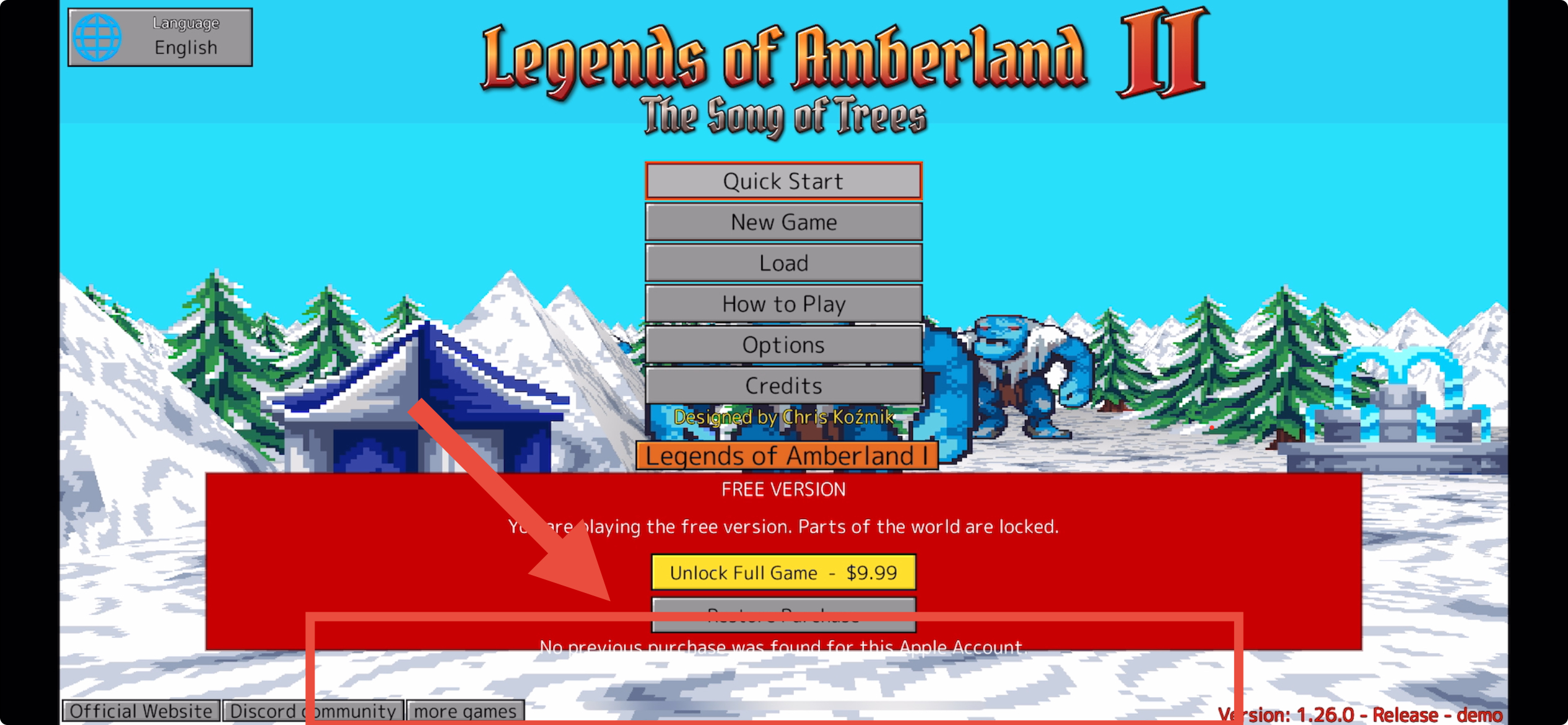
The ‘No previous purchase was found for this Apple Account’ message appears at the bottom edge of the red free-version panel. The text extends beyond the panel and overlaps the background, reducing readability.
Expected Result:
The purchase restoration feedback should be displayed entirely within the free-version panel, with appropriate padding and sufficient contrast to ensure readability.
During testing, I identified several issues, primarily related to offline character creation, audio behavior, and feedback. The most significant issue occurs when starting a new game in Airplane Mode, where character avatars are initially missing from the character creation screen. Further testing is recommended to verify offline app behavior and ensure consistent notification handling across different game states.