Bugs found in Flexi AI Tutor

Flexi AI Tutor supports students and teachers by delivering AI-powered assistance across subjects, offering tools for learning goals and lesson preparation. The platform aims to simplify education through personalized content and interactive support.
Our QAwerk team performed a comprehensive Bug Crawl on Flexi AI Tutor, identifying issues that may disrupt the user experience and hinder productivity.
Below are detailed bug descriptions, which foster understanding and guide enhancements for a more reliable platform.
Student version can't open “Georgia” page from subject page
Severity:
Major
Precondition:
User logged in.
Steps to Reproduce:
- Open “Subject” dropdown.
- Select any subject.
- Open “Subject” dropdown again.
- Click “Georgia”.
Environment:
MacOS Sequoia 15.1.1; Chrome v.138.0.7204.158, Firefox v.141.0, Safari v.18.1.1
Actual Result:
The page does not open.
Expected Result:
The page should open normally.
Profile photo size error message called from browser, not in-app
Severity:
Major
Precondition:
User logged in.
Steps to Reproduce:
- Go to Profile dropdown.
- Go to the Settings.
- Pick Change Profile.
- Upload a photo larger than 2MB.
Environment:
MacOS Sequoia 15.1.1; Chrome v.138.0.7204.158, Firefox v.141.0
Actual Result:
An error message appears in the browser window.
Expected Result:
The error message should appear within the app interface.
Pictures and text overlapped in Explore dropdown
Severity:
Major
Precondition:
User logged in.
Steps to Reproduce:
Open the “Explore” dropdown.
Environment:
MacOS Sequoia 15.1.1; Firefox v.141.0, Safari v.18.1.1
Actual Result:
Overlapping text and pictures.
Expected Result:
Clean layout as in Chrome browser.

Teacher version Output history not visible in Firefox, visible in Chrome
Severity:
Major
Precondition:
- Account with assistants and history.
- Log in to your Firefox account.
- Switch to Teacher Version.
Steps to Reproduce:
- Access “Let AI handle the prep”.
- “Output history”.
Environment:
MacOS Sequoia 15.1.1; Firefox v.141.0
Actual Result:
Output history not displayed.
Expected Result:
Output history visible.
Student version search does not reflect partial book name results
Severity:
Minor
Precondition:
User logged in with books in the library.
Steps to Reproduce:
- Go to Profile.
- Go to the Library.
- Search with a partial book name.
Environment:
MacOS Sequoia 15.1.1; Chrome v.138.0.7204.158, Firefox v.141.0, Safari v.18.1.1
Actual Result:
Page not found error.
Expected Result:
Relevant results shown.
Assistant was generated by example, but was not saved in Output history
Severity:
Minor
Precondition:
User logged in.
Steps to Reproduce:
- Use “Let AI handle the prep”.
- Select assistant.
- Click “Try Example” — Generate.
- Return to Output History.
Environment:
MacOS Sequoia 15.1.1; Chrome v.138.0.7204.158, Firefox v.141.0, Safari v.18.1.1
Actual Result:
Assistant missing from history.
Expected Result:
Assistant appears in the Output history.
[x] button overlaps agent invite link title
Severity:
Minor
Precondition:
User logged in.
Steps to Reproduce:
Create a new agent, show the invite link.
Environment:
MacOS Sequoia 15.1.1; Chrome v.138.0.7204.158, Firefox v.141.0, Safari v.18.1.1
Actual Result:
Close button overlaps title end.
Expected Result:
The button should not overlap the title.
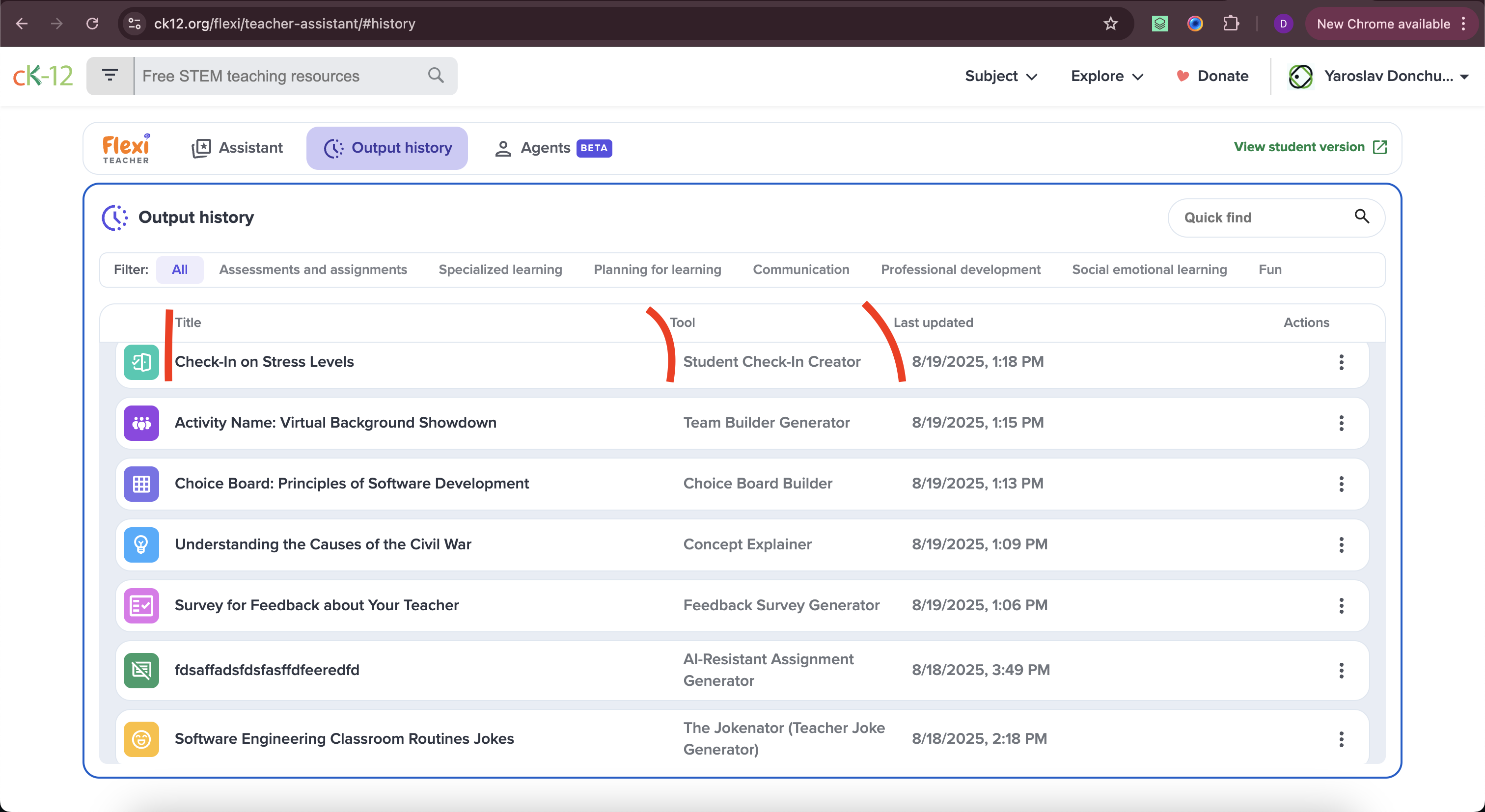
Output history titles misaligned with text
Severity:
Trivial
Precondition:
User logged in with assistants.
Steps to Reproduce:
Open the Output history page.
Environment:
MacOS Sequoia 15.1.1; Chrome v.138.0.7204.158, Safari v.18.1.1
Actual Result:
Text not aligned with titles.
Expected Result:
Text properly aligned.
Line break not added to input after pressing Enter
Severity:
Trivial
Precondition:
User logged in.
Steps to Reproduce:
- Type text in the “Ask me anything” field.
- Press Enter.
Environment:
MacOS Sequoia 15.1.1; Chrome v.138.0.7204.158, Firefox v.141.0, Safari v.18.1.1
Actual Result:
No line break added.
Expected Result:
Line break should be added correctly.
Flexi icon moved to footer after opening and closing chat
Severity:
Trivial
Precondition:
User logged in.
Steps to Reproduce:
- Navigate through Subject.
- Pick Biology.
- Click Topic.
- Go to Section.
- Scroll to the footer.
- Click the Flexi icon, close chat.
- Observe icon position.
Environment:
MacOS Sequoia 15.1.1; Chrome v.138.0.7204.158, Firefox v.141.0, Safari v.18.1.1
Actual Result:
Flexi icon moves to the footer improperly.
Expected Result:
Icon stays in place.
Flexi AI Tutor has a mix of critical, major, and minor bugs affecting navigation, usability, and UI layout. Fixing these will support smooth learner and teacher experiences and boost platform confidence.