Bugs found in ServiceM8 SaaS

ServiceM8 is an innovative platform specifically designed for trade and service businesses to manage operations more efficiently. The application leverages technology to help streamline the process from job quoting and client communication to invoicing and payment.
ServiceM8 offers a vast array of features, including job tracking, scheduling, quoting, invoicing, and forms. They speed up the daily activities of trade and service businesses. Furthermore, the platform includes real-time job tracking and reporting tools to assist users in critical decision-making processes.
During our rigorous bug crawl, we discovered several small issues that may impact performance and user experience. Let’s take a closer look at these findings to understand how to enhance the ServiceM8 platform.
400 Bad Request error on external auth request
Severity:
Major
Precondition:
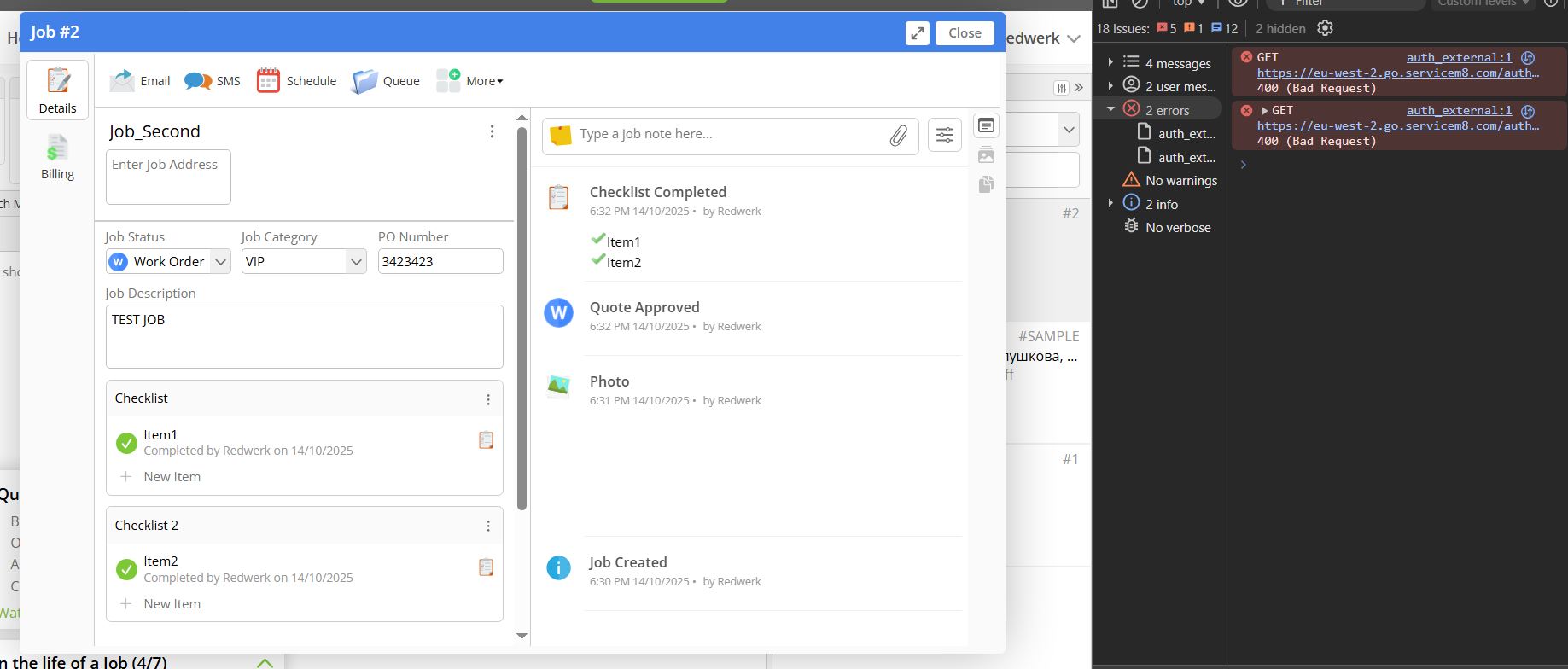
The user is logged into the system and is working with a job in the “Job Management” module (e.g., Job_Second).
Steps to Reproduce:
- Log in to the system.
- Open the browser’s developer console.
- Open any job task (e.g., Job_Second).
- Observe the developer console for any network activity related to external authentication.
Environment:
OS: Windows 10 Chrome version 140, Firefox 142.0.1, Edge 140.0.3485.66
Actual Result:
The system sends a GET request to:
https://eu-west-2.go.servicem8.com/auth_external
The response is 400 Bad Request.
Expected Result:
The request should be completed successfully (e.g., 200 OK) and return the required auth data or redirect.
TypeError: Cannot read properties of null (reading 'postMessage')
Severity:
Minor
Precondition:
User is logged into the system and navigates to the “Manage Templates” page.
Steps to Reproduce:
- Log in to the system.
- Go to Invoicing (Quote and Work Order) → Manage Templates.
- Open the browser’s developer console.
- Click the “Use this template” button.
Environment:
OS: Windows 10 Chrome version 140, Firefox 142.0.1, Edge 140.0.3485.66
Actual Result:
An uncaught TypeError is logged in the console: Cannot read properties of null (reading ‘postMessage’) at VM1395 content_script.js:8133:18.
Expected Result:
No JavaScript errors should be logged in the console.
The script should first check whether the target object exists before calling .postMessage().

400 Bad Request error on vendor logo retrieval
Severity:
Minor
Precondition:
The user is logged into the system and opens the “Send Email” dialog to email an invoice to a client.
Steps to Reproduce:
- Log in to the system.
- Navigate to Invoicing → Summary.
- Open the browser’s developer console.
- Select an invoice and click the “Email” button.
- Observe the console after the “Send Email” pop-up is displayed.
Environment:
OS: Windows 10 Chrome version 140, Firefox 142.0.1, Edge 140.0.3485.66
Actual Result:
The system attempts to send a GET request to:
https://no-cookies-cdn.servicem8.com/VendorLogo_ShowLogo
The server responds with: 400 Bad Request.
Expected Result:
The vendor logo should load correctly without triggering a 400 error.

I tested the ServiceM8 platform over several days, and overall, the experience was positive. The core features, such as job creation, templates, email sending, and invoicing, are well thought out. During testing, I noticed occasional 400 Bad Request errors. Resolving those issues will make the platform even more efficient and user-friendly.