Bugs Found in OLY: Personal Fitness Coach for iOS

OLY is an AI-powered app that provides users with a personal coach that helps guide their fitness training. The app considers your physiology, goals, and schedule to develop a training plan that delivers the best results on any given day.
The app’s outstanding feature is the profiling test it runs to place users into specific categories and develop more personalized plans based on the outcomes. It also features an AI coach named ‘Teddy’ that helps adjust the sessions further.
We tested OLY as part of our regular bug crawls, and the QAwerk team liked the app overall. The core functionality is solid and works as promised. However, we discovered a few UI/UX bugs that affect the overall experience. Read our detailed report below.
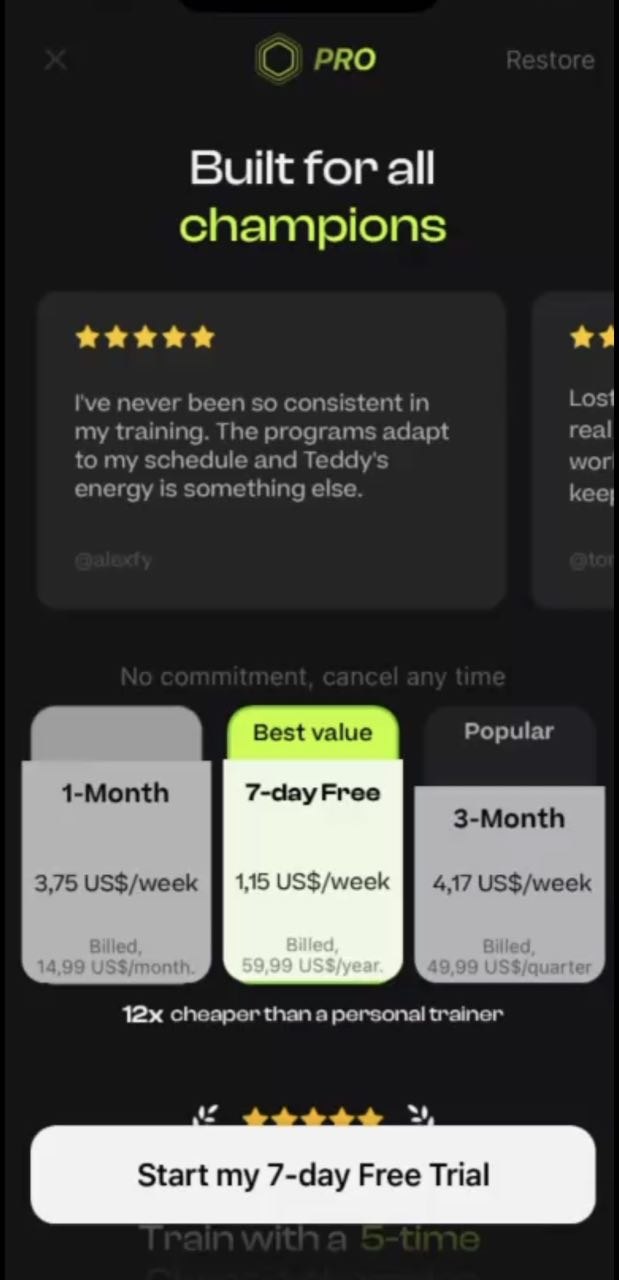
‘Start my 7-Day Free Trial’ CTA is displayed for user who is no longer eligible for free trial
Severity:
Major
Precondition:
- The user has already redeemed the 7-day free trial for the subscription.
- The user re-installed the app.
- The user opened the app and passed the introduction pages.
- The user is on the Build for all champions’ page.
Steps to Reproduce:
- Tap the ‘Start my 7-day trial’ button.
- Proceed with confirmation.
Environment:
iPhone 14 Pro, iOS version 26.6
Actual Result:
The paywall displays the ‘7 Days Free Trial’ option, suggesting that the user will receive another 7-day free trial. However, after purchase confirmation, the user is charged for the yearly subscription because they are no longer eligible for the introductory trial.
Expected Result:
The app should check the user’s introductory-offer eligibility before displaying the subscription offer. If the user is no longer eligible for the free trial, the ‘7 Days Free Trial’ CTA should not be displayed. Instead, the CTA and subscription information should clearly indicate that the yearly subscription will be charged immediately.
Exercise video playback does not resume after returning app from background
Severity:
Major
Precondition:
The user is on the home page.
Steps to Reproduce:
- Tap the ‘Start’ button on any program.
- Open an exercise.
- Verify that the video started playing.
- Move the app to the background.
- Navigate back to the app.
Environment:
iPhone 14 Pro, iOS version 26.6
Actual Result:
The exercise video stops playing after the app is moved to the background and remains stopped after returning to the app.
Expected Result:
The exercise video should remain in a valid playback state after the app returns to the foreground. If automatic playback is expected, the video should resume from the position where it was interrupted. Otherwise, it should remain paused at the same position and allow the user to resume playback manually.
‘Something went wrong on our side. Please try again in a moment - I’m still here for you’ error message is displayed if user tries to change today’s session
Severity:
Major
Precondition:
The user is on the home page.
Steps to Reproduce:
- Open the ‘Fitness’ app.
- Tap the ‘Teddy’ avatar in the bottom-right corner.
- Select the ‘Change today’s session’ option.
- Wait for ‘Teddy’ to process the request.
- Observe the response in the chat.
Environment:
iPhone 14 Pro, iOS version 26.6
Actual Result:
After processing for some time, ‘Teddy’ displays the ‘Something went wrong on our side. Please try again in a moment — I’m still here for you.’ error message.
Expected Result:
‘Teddy’ should successfully initiate the ‘Change today’s session’ flow and provide the relevant options/questions for modifying the workout. The user should not receive a generic server-side error under normal conditions.
‘Try Again’ button text is clipped on offline session screen
Severity:
Minor
Precondition:
- The user is on the ‘Program details’ page.
- The device has no internet connection (airplane mode is enabled).
Steps to Reproduce:
- Tap the Start’ button on any workout.
Environment:
iPhone 14 Pro, iOS version 26.6
Actual Result:
The ‘Try Again’ button is displayed, but its label text is vertically clipped and does not fit correctly within the button.
Expected Result:
The ‘Try Again’ button and its text should be fully visible, properly centered, and displayed within the button boundaries on all supported screen sizes.

The OLY app functions properly, and the main functionality is stable. However, the main concern is the free trial and subscription process, particularly how the trial status and CTAs are presented to users. During testing, I also detected a few minor UI/UX issues.