Bugs Found in Ninja AI: Chat, Code & Create for iOS



Ninja AI provides an ecosystem where innovative ideas can be transformed into efficient solutions through autonomous AI agents. These intelligent agents can handle complex tasks, including coding, research, writing, image generation, and workflow automation. Moreover, these operations often take place within secure virtual machines.
The application’s robust functionality enables users to effortlessly automate and deploy smart applications and workflows. The primary focus is placed on swift transitions from concept formation to the efficient execution of the solution.
At QAwerk, we conducted a bug crawl of Ninja AI and identified several bugs, including a critical issue that prevents the user from interacting with the app. We invite you to delve into our findings to understand how these shortcomings could affect the application’s overall functionality.
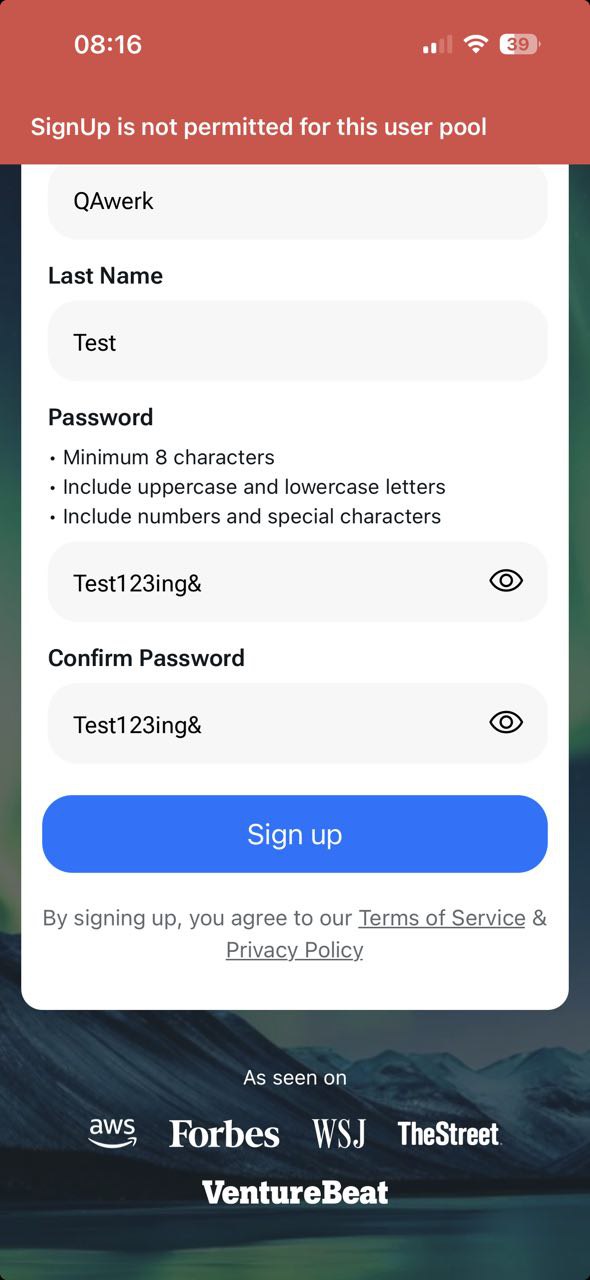
Impossible to sign up with email
Severity:
Critical
Precondition:
The app is installed.
Steps to Reproduce:
- Launch the app.
- Enter a valid email address (in this case, a Gmail account was used).
- Select the ‘Sign up with email’ option.
- Fill out the ‘First name’ field.
- Fill out the ‘Last name’ field.
- Enter a password.
- Tap the ‘Sign Up’ button.
Environment:
iPhone 14 Pro, version 26.2.1
Actual Result:
The error message stating: ‘SignUp is not permitted for this user pool’ is displayed.
Note: The user can successfully sign up by selecting the Gmail option from the provided list.
Expected Result:
The user should be able to sign up successfully using any valid email address.
‘Profile updated successfully’ notification message is displayed when no updates to the user’s profile have been made
Severity:
Major
Precondition:
- The app is installed.
- SuperNinja Agent mode is enabled.
Steps to Reproduce:
- Navigate to the ‘Settings’ page.
- Place the cursor in the ‘First Name’ field.
- Make no changes to the ‘First Name’ field.
- Move the cursor outside of the ‘First Name’ field.
Environment:
iPhone 14 Pro, version 18.6.2
Actual Result:
The ‘Profile updated successfully’ message is displayed even when no changes are made.
Expected Result:
The user should not receive any notifications if no changes were made on the page.
‘Thread not found. Please verify you’re logged in into the correct Ninja account’ error message is displayed after opening task related to deleted project
Severity:
Major
Precondition:
- The app is installed.
- The app is open.
Steps to Reproduce:
- Create a new project.
- Create a new task within the project.
- Delete the project.
- Open the task that is still visible in the left menu.
- Switch between the ‘New project’ menu and the remaining task.
Environment:
iPhone 14 Pro, version 18.6.2
Actual Result:
The user can still see the created task even after the related project folder has been removed. After a few seconds, the user sees the ‘Thread not found. Please verify you’re logged in to the correct Ninja account’ error message upon opening the created task.
Expected Result:
The created task should be deleted in conjunction with the project, without delay.
Inability to add real-time photo to project
Severity:
Major
Precondition:
- The app is installed.
- The app is open.
- A project has been created.
- A file has been uploaded from the gallery in the ‘Files’ tab.
Steps to Reproduce:
- Navigate to the ‘Files’ tab in a created project.
- Tap the ‘Add file’ button.
- Select the ‘Take photo or video’ option.
- Take a photo and tap the ‘Use photo’ button.
Environment:
iPhone 14 Pro, version 18.6.2
Actual Result:
The photo taken during the action was not added to the file list.
Expected Result:
The photo taken during the action should be successfully added to the file list.
Possibility to submit empty feedback
Severity:
Minor
Precondition:
- The app is installed.
- A conversation in the chat exists.
Steps to Reproduce:
- Open an existing conversation.
- Verify that the ‘Rate a response’ section is displayed below the response.
- Rate the response.
- Tap the ‘Tell us why?’ link.
- Do not input any feedback and tap the ‘Submit’ button.
Environment:
iPhone 14 Pro, version 18.6.2
Actual Result:
The ‘Submit’ button is active even when no value is entered.
Expected Result:
The user should not be able to send blank feedback. The ‘Submit’ button should be deactivated if no feedback has been entered.
Misplacement of ‘Cross’ button on ‘Settings’ pop-up
Severity:
Minor
Precondition:
- The app is installed.
- A conversation in the chat exists.
Steps to Reproduce:
Navigate to the ‘Settings’ section.
Environment:
iPhone 14 Pro, version 18.6.2
Actual Result:
The ‘Cross’ button is displayed in the top middle of the pop-up.
Expected Result:
The ‘Cross’ button should ideally be displayed in the top-right corner, in line with other pop-ups.

After testing, I can conclude that the application appears to be quite stable. Overall, one critical defect was identified in the sign-up process, which may be due to insufficient clarity around the system’s requirements or expected behavior. Comprehensive functional and performance testing should help resolve any existing issues and improve the app in the long term.