Bugs Found in Clove: Import & Share Recipes for iOS



Clove is an extraordinary app that can help everyone who cooks, even a little, in their daily lives. The idea of importing recipes from social media, organizing them into collections, and planning meals for the week feels modern, practical, and engaging. The app solves a real user problem and has strong potential for regular daily usage.
Clove also goes a step further by offering access to curated collections of vetted recipes and the ability to generate smart grocery lists. Moreover, you can add recipes not only from social media and websites, but also from printed cookbooks and even Notes and Google Docs.
The QAwerk team was impressed by this app, and we conducted a comprehensive bug crawl to explore it thoroughly. White testing, we discovered a few functional issues with the recipe import flow and validation handling. Please see our report and suggestions for improving this great app below.
Duplicate recipe import from TikTok allowed
Severity:
Major
Precondition:
The app is installed.
Steps to Reproduce:
- Import a recipe from TikTok using a valid video link.
- Complete the import successfully.
- Import the same TikTok recipe again using the same link.
- Observe the result.
Environment:
iPhone 14 Pro, iOS version 26.4.2
Actual Result:
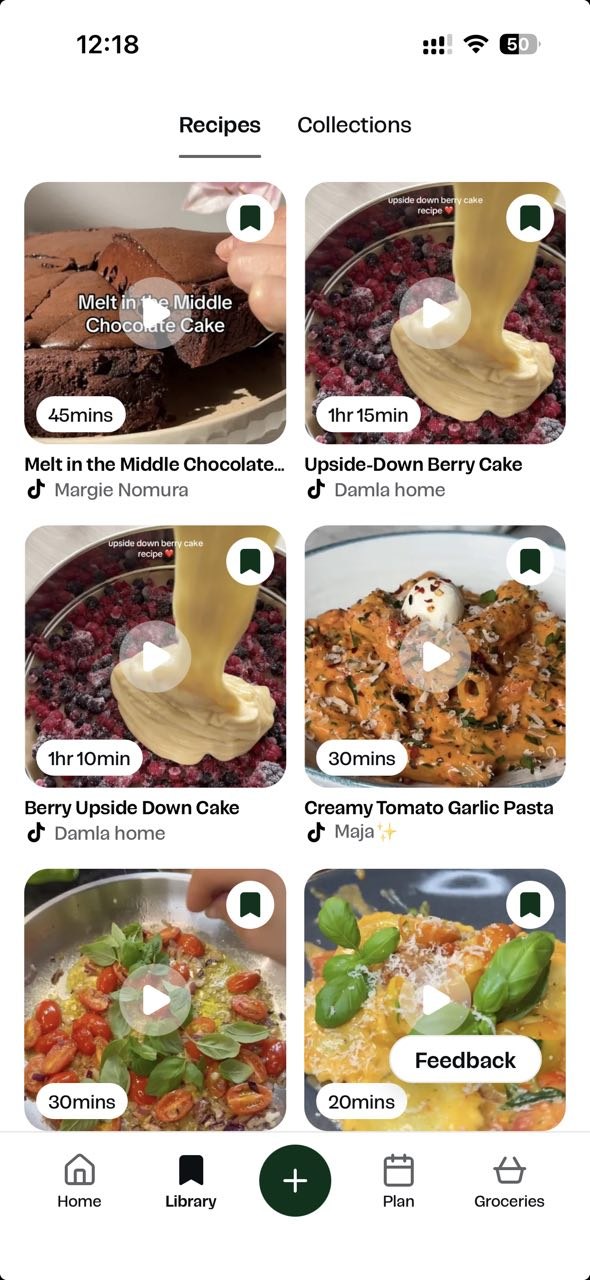
The same recipe is imported multiple times, creating duplicate recipe entries in the app.
Expected Result:
The system should detect already imported TikTok recipes and prevent duplicate imports, or clearly notify the user that the recipe already exists in their collection.
Recipe import continues even after user cancels recipe addition flow
Severity:
Major
Precondition:
The app is installed.
Steps to Reproduce:
- Start importing a recipe from TikTok.
- During the recipe addition flow, tap the ‘Cancel’ button.
- Navigate back to the recipes list/library.
- Observe the imported recipes.
Environment:
iPhone 14 Pro, iOS version 26.4.2
Actual Result:
The recipe is still imported and added to the user’s recipe collection even after the user canceled the flow.
Expected Result:
After tapping the ‘Cancel’ button, the recipe import process should stop, and the recipe should not be added to the user’s collection.
Temporary error page is displayed when opening imported recipe from push notification
Severity:
Major
Precondition:
- The app is installed.
- A recipe has been imported from TikTok.
Steps to Reproduce:
- Wait to receive a push notification.
- Tap the push notification.
- Observe the navigation to the imported recipe page.
Environment:
iPhone 14 Pro, iOS version 26.4.2
Actual Result:
Occasionally, after tapping the push notification, the user is redirected to the imported recipe. However, before the recipe opens, an ‘Oops, something’s wrong’ page is displayed for a few seconds.
Expected Result:
After tapping the push notification, the user should be taken directly to the imported recipe page, without an intermediate error page.
If the recipe data is still loading, the app should properly display a loading state rather than an error page.
No validation message is displayed when collection name contains only whitespaces
Severity:
Major
Precondition:
- The app is installed.
- The user is on the ‘Create Collection’ pop-up.
Steps to Reproduce:
- Enter whitespaces only in the input field when naming a new collection.
- Tap the ‘Save’ button.
Environment:
iPhone 14 Pro, iOS version 26.4.2
Actual Result:
Nothing happens after tapping the ‘Save’ button. No validation message is displayed, although the entered value is invalid.
The validation message is displayed only when the input field is completely empty.
Expected Result:
Whitespace-only values should be treated as empty/invalid.
After tapping the ‘Save’ button, the system should display a clear validation message.
‘Success’ review message is displayed for empty recipe form
Severity:
Major
Precondition:
- The app is installed.
- The user is on the ‘Library’ tab.
Steps to Reproduce:
- Tap the ‘Edit’ icon in the top left corner of the page.
- Select the ‘Create Recipe’ option.
- Leave all fields empty.
- Scroll down to the end of the page.
- Tap the ‘Review’ button.
Environment:
iPhone 14 Pro, iOS version 26.4.2
Actual Result:
The message ‘Your recipe looks great. No changes needed’ is displayed despite no recipe details filled in by the user.
Expected Result:
The system should validate required recipe fields before review.
If mandatory fields are empty, the user should see clear validation messages and should not receive a positive review confirmation message until the recipe contains valid required data.
Recipe is added to collection with significant delay
Severity:
Major
Precondition:
- The app is installed.
- The user has created their own collection.
Steps to Reproduce:
- Navigate to the recipe.
- Tap the ‘Collection’ button.
- Select the desired collection.
- Tap the ‘Done’ button.
- Navigate to the ‘Library’ tab.
- Switch to the ‘Collections’ tab.
- Check the added recipe in the collection.
Environment:
iPhone 14 Pro, iOS version 26.4.2
Actual Result:
The recipe is added to the selected collection only after approximately 30 seconds.
Expected Result:
The recipe should be added to the selected collection immediately.
Upon placing cursor in ‘Paste Link’ input field in ‘Add Recipe’ pop-up, content becomes overlapped
Severity:
Minor
Precondition:
The app is installed.
Steps to Reproduce:
- Navigate to the ‘Add Recipe’ pop-up.
- Place the cursor in the ‘Paste Link’ input field.
- Observe the content overlap.
Environment:
iPhone 14 Pro, iOS version 26.4.2
Actual Result:
The content gets overlapped.
Expected Result:
The content should be displayed properly without any overlap.
During testing, I identified several functional issues related to the consistency of the recipe import flow, validation handling, collection management, loading behavior, and navigation/state synchronization scenarios. A few cases may affect overall usability and create confusion during recipe management flows. I recommend implementing QA best practices and running comprehensive usability testing to help the app achieve maximum performance.